............................................Welcome To Grandma Bonnie's Closet.............................................
Showing posts with label Verizon wireless. Show all posts

Friday, December 20, 2013

So Sad To See The End

Disclosure: I am participating in the Verizon Boomer Voices program and have been provided with a wireless device and six months of service in exchange for my honest opinions about the product.

As 2013 comes to an end so will the Verizon Boomer Voices Program that I have been a part of. It is sad to see this program end. I have benefited in learning first hand about all the new innovative products and services Verizon has to offer their customers. Although I have been a Verizon Wireless customer for many years it was not until I joined this program that I became aware of how great Verizon's services really are. 
Verizon has made it easy for customers like myself to learn about the connected devices we own. 
One of the ways a customer can learn how to use their connected device to its full potential is to attend an educational work shop that is made available in stores like  Verizon Destination Store at Mall of America
Another way a customer can learn to use their connected device not only to its full potential but to optimize for the best personal use is by adding Verizon's Tech Coach to your phone service. I just love this service. 
Verizon Tech Coach is a service that gives you over-the -phone, in person(not a robot or computer) technical support from device experts. This includes support for apps, cloud services, connected devices, printers, routers, and computers. The Tech Coach can even remotely access your Android phone, PC or Mac if you are comfortable with that. I for one like this idea. You see when something is not working for me I will gladly let an expert fix it and lower my frustration level by 100%. 
Now you know what my two favorite services are from Verizon. But I figure you might want to know what my favorite smart phone is. At this time I have compared three smart phones and have come to the conclusion that my favorite by just a pinch The Samsung Galaxy Note 3 which is just slightly better in my opinion than my Galaxy SIII. The Droid Razr Maxx HD came in third by just a smidgen. All three phones are great Smart Phones and I have not had any issues using any one of the three. You can check out how I compared them in this past post if you missed the comparison.
I want to thank Verizon for allowing me to be a part of the Boomer Voices Program. Thank you for the the experience that will stay with me for many years to come.


Friday, December 13, 2013

A Smart Phone For Grandma

Disclosure: I am participating in the Verizon Boomer Voices program and have been provided with a wireless device and six months of service in exchange for my honest opinions about the product.

So, with Christmas just around the corner you are probably finishing up your holiday shopping. You might want to reconsider that sweater, slippers or bottle of cologne you got grandma. Take my advise grandma wants a smart phone. Of course you already know all the wonderful things a smart phone can do. But I want to give you a list of some of the features a grandmother like myself might find useful.

The following is a list of how I use my smart phone.
1. Obviously, I call and text with my phone.
2. Keep up with my email.
3. Pay bills and check bank accounts.
4. Blog
5. Keep up with social media, Twitter, Facebook and more.
6. Read books.
7. Skype with my grandchildren
8. Hangout with my grandchildren.
9. Take and share pictures of my grandchildren.
10. Use a GPS app VZ Navigator to travel to my grandchildren's homes. Their families have moved twice over the last year. The VZ Navigator has saved use many times.
11. Watch movies with my grandchildren. Usually when we are traveling in a vehicle together.
12. Play toddler games with my grandchildren. I have several apps loaded on my phone just for my grandchildren.
13. Sharing my mobile hot spot with my grandchildren's tablets. That way I can use my phone while they play their educational games.
14. With all the apps I have on my phone now. I could list at least a dozen more uses such as my calendar, alarm clock, radio and more.

When picking a smart phone for grandma you should take into consideration what features would be convenient for her. For instance if she takes lots of photos then a good camera on the cell phone is a must. If grandma has a vision problem a large screen might be appropriate.

Let's compare the three smart phones I am currently carrying. Yes, I have three smart phones I have been using for a while now. I purchased a Samsung Galaxy S 3 in January 2013. In June 2013 I became a participant in the Verizon Boomer Voices program and was given a Droid Razr Maxx HD to review. Just recently Verizon has added the Samsung Galaxy Note 3 to the program to be reviewed. 
I will just highlight the features of each phone. If you would like to go a little deeper you may want to stop by a Verizon Wireless Store near you. They will be happy to help you select a phone just right for you or your grandmother!
They all have great features.Being all are android phones I can easily use and switch between each device. 
The Samsung Galaxy S3 is a winner for being light weight which is easy on arthritic hands. It has a fantastic camera which is easy to use. I have no complaints about the battery life which is good but not great. 
The Droid Razr Maxx HD is a winner for its battery life. It is rugged which if you are hard on a phone this is great for that accidental drop. The camera is good but not great. One complaint it is heavy for arthritic hands. Using a blue tooth head set helps with this complaint.
Finally the Samsung Galaxy Note 3. It is the winner in my book on all accounts. The large screen is great for reading. The S Pen is perfect for writing notes instead of typing. The battery life is totally awesome. The camera beats the other two phones with out a doubt! 
Readers, What do you think? Which phone would your grandmother like? Which phone would you prefer?

Monday, December 9, 2013

Important Fitbit One Follow Up

Disclosure: I am participating in the Verizon Boomer Voices program and have been provided with a wireless device and six months of service in exchange for my honest opinions about the product.

This post is long over due. I have had a little struggle writing this blog post. I have not been sure how I wanted to approach this subject. As most of my friends and readers know I usually do not write about my health. I like to write about happy subjects such as my sweet grandchildren, recipes, DIY projects and lots of product reviews. You may have noticed I have not written much lately except about the products I have accepted for review. I have been having some health issues that have taken away some of my computer time.

Over the last six months I have been privileged to wear a Fitbit One wireless activity tracker. I have enjoyed the perks of keeping up with my exercise, diet and sleep tracking. While wearing the Fitbit One I have been able to see why I have been so tired and exhausted during my waking hours. I was able to see how restless my sleep really was. I shared this information with my doctor and we came up with a plan to help improve my sleep. After following the suggestions my doctor made I continued to track my sleep with the Fitbit One. I had some improvement to be sure. The suggestions seemed to help with my daytime energy levels. I still felt that I was not getting enough rest and would run out of energy early in the day. Not being able to focus on normal daily tasks and falling a sleep at the computer where just a few of the symptoms I have been experiencing. 
Once again I printed off the sleep record my Fitbit One provided. With this information in hand I made a follow up appointment with my family doctor. After looking over my sleep record, my doctor has decided we need to run some tests. He suspects Sleep Apnea might be what is causing part of my health problems. I will keep you updated with the test results in the near future. 
I want to thank Verizon Wireless for allowing me to be a part of the Verizon Boomer Voices Program and for the amazing Fitbit One they have provided for review. As the Verizon Boomer Voices Program comes to an end I am going to miss being a part of this awesome group and the wonderful service Verizon has provided. I expect to remain a loyal customer for many years to come. 
You can read my past post about the Fibit One and all it can do here.

Friday, December 6, 2013

A Verizon Boomer Voices Party In The Making

Disclosure: I am participating in the Verizon Boomer Voices program and have been provided with a wireless device and six months of service in exchange for my honest opinions about the product.

Being a part of the Verizon Boomer Voices program has given me the opportunity to try out some newest, hottest, and trendiest cell phones on the market today. I have learned a lot along the way about products and services offered by Verizon Wireless. I have been privy to hot deals like this one being offered now. "Red-Hot Deal!! 7" Samsung Galaxy Tab for $99 w/new 2-yr activation. Get it here! Offer ends 12/9 so hurry to get this deal.
Now I am in the party preparation stage of my second Verizon Boomer Voices House Party. If you missed the details on my first House Party check it out here. I know you are all wondering, "What happens at a Verizon Boomer Voices House Party?" Well, let me tell you what you can expect if you are invited to a party like this one. First, you are not going to need your wallet, checkbook or credit card. There is nothing being sold and nothing to purchase. You can expect to learn about the latest and greatest technological devices available at Verizon Wireless stores across the country and online. You should also expect a swag bag full of awesome Verizon Goodies, games, prizes, good food and lots of fun.

My last party was attended by some tech savvy friends, family and co-workers with many being in the boomer age group. This second party is going to be a little different. I have asked my children to invite their very tech savvy friends which are in a much younger age group. I would say the 20 something age group. So, I am betting they are going to be very interested in the hot prizes I am giving away at this party.

I will give you a few clues to some of the awesome prizes. 
Clue #1: A portable energy source for on the go!
Clue #2: Its small, makes a big sound, no wire needed!
Clue #3: It can be connected, makes for great book reading!
Try and guess what the prizes might be. Follow @grandma_bonnie on twitter for some more clues to my Verizon Boomer Voices House Party Prizes.  I am off now in search of a new recipe that will Wow my party guests. 

Wednesday, October 2, 2013

My First Verizon Boomer Voices Party

Disclosure: I am participating in the Verizon Boomer Voices program and have been provided with a wireless device and six months of service in exchange for my honest opinions about the product.

I am in the final phase of planning for my first Verizon Boomer Voices House Party. I can hardly wait until Saturday the big day. I know you understand all the work involved in planning a party.  I am sure you have been wondering why I have been missing from the blog world these past few days.  Well, this is what I have been busy doing. Party planning can sure keep a Grandmother busy.
First, I planned a great cake. You had to know I would be making a cake. It has a Verizon Boomer Theme and revolves around being connected.

One of my friends helping trim up a modeling chocolate cake topper I made. With Jess's help I was able to make two really nice cake toppers. Two more toppers are in the making. 
I have several great Verizon Wireless products to show off and giveaway to my party guests. One of my favorite products is going to help a family stay on top of whats happening at home while away from home. Another product will be keeping a party guest on top of their health. There are lots more products to give away. I will fill you in right after the party. My party guests will be playing a Verizon Trivia game that yours truly has made up.  We will also be playing a game I am calling "Get Connected if the Price is Right"!
Each of the party guests will be taking home a swag bag filled with lots of goodies courtesy of Verizon Wireless. 
I have got to get back to getting this party put together. Check back after the weekend for lots of party pictures and information on the products I am giving away at the party. I hope you all Stay Connected!

Sunday, September 22, 2013

My Thoughts About Smartphones & Staying Connected

Disclosure: I am participating in the Verizon Boomer Voices program and have been provided with a wireless device and six months of service in exchange for my honest opinions about the product.

This post is for my blogging  friends that are holding on to your basic cell phones and not embracing the newest in smartphone technology available.
This is a true story. It happened about 5 years ago give or take a few months.  When we first changed over to smartphones from our basic clam shell cellphone I was a bit angry. It kind of happened just out of the blue. My hubby and I were due for an up grade.
I went into the store with a specific basic phone in mind. It was a model that was good for a person who was rough on a phone. I was like that. I had laundered two cell phones in the past. Dropped a cell phone in an elevator shaft and so forth and so on. Yep, I was definitely rough on my cell phones. That day my husband was looking at the smartphones and he really wanted the Galaxy S. I told him go for it! But, there was a sale going on and he wanted the sale price. The deal was buy one get one free. I held out for all of maybe five minutes and my dearest won the battle. He agreed to buy the insurance because I was totally sure I would be laundering that phone in no time at all. That is the short version on how we changed to using smartphones.
I do have to tell you the first week I was still sure it was a mistake to carry such expensive and fragile electronics in my purse or pocket. But as time flew by I became accustom to having the Internet at my side 24/7. I had apps for everything I could possibly want. Weather at my finger tips, maps, directions and anything the Internet offered. I still have my old Galaxy S. I never washed or dropped it. So, I learned to be just a little more careful of where my phone was at any given time. I changed to a new Galaxy S3 which I treat like my right hand. It keeps the world at my finger tips. I am also carrying a Droid Razr Maxx HD courtesy of Verizon and the Verizon Boomer Voices Program.
At this time I do not know what I would do without the Droid Razr Maxx HD. Being a blogger I need to be in constant contact with my sponsors, have email at my finger tips and be able to research on the go. If I did not have a smartphone I would be stuck at home doing my work from a desk.
I travel often to see my grandchildren. I do not want to give up  my travels in order to keep blogging. Carrying a smartphone is like having my home office in my pocket. So, I can travel and blog at the same time. See, you can have your cake and eat it too!
I love the Galaxy S3 but I love the Droid Razr Maxx HD just a little more. Why? It has the most awesome battery life you could ever imagine. I have been able to use the phone for two to three days at a time before having to recharge. The Droid Razr Maxx HD is meant for a traveling, blogging grandmother like myself. I know some of you might be thinking it is hard to type a post from a cellphone even the smartest smartphone may not be comfortable to type long posts with. Well, I have written short posts, posted photos, answered emails and tweeted from my smartphone with comfort and ease. When I want to write a longer more involved post I use my smartphone as a mobile hotspot. I hook up my laptop and I am ready to connect with my blog. I use many social media apps like Facebook, twitter, G+ and Linkedin right on my smartphone. Traveling with a smartphone has made it easy for me to stay connected to my grandchildren, my business sponsors, my blog and social media sites. I could not ask more from any phone.
My blogging friends, What do you think? Would a smartphone keep you connected? Would one make your life a little easier?

Wednesday, August 28, 2013

Keeping My Favorite Photos Safe

Disclosure: I am participating in the Verizon Boomer Voices program and have been provided with a wireless device and six months of service in exchange for my honest opinions about the product.

Blog photos, family photos, and just everyday photos boy, oh boy have I got photos.  As a Grandmother, blogger, wife and traveler I have tons of photos I would like to keep safe. Today I am going to share a little about my photo saving problems and the solution I was able to come up with to solve this issue. I started out by asking myself a few questions. If you would like to join my brainstorming session and see where it leads. Please answer the questions with me. Feel free to express yourself in the comments section of the post. I would love to hear your ideas and solutions to this problem.  

How often do you use your cell phone camera to take pictures?

Many times I have found my cell phone camera useful in capturing that spur of the moment event that I would not have been able to because I did not have a camera on me. I think about the first time my grandson started walking. No one was expecting it at the moment. There were no real cameras lying about. So we all whipped out our cell phones and started snapping pictures as fast as we could.
Conclusion to question one. Cell phones are great for capturing life's most important memories.

How many photos do you have stored on your phone?

I have over 1,500 on my new phone. My new phone is only a few months old. The last cell phone I used had over 5,000 pictures and videos stored on the phone. I am wondering if I am the only person who does not delete photos.
Conclusion to question two. Cell phones sure can store a ton of photos. But are they safe?

How do you move your photos from your phone to your computer?

This is the one problem I have not solved until just recently. In the past when I wanted to move photos from my cell phone I would email each and every photo to myself. Although this was tedious and only allowed me to move one or a few photos at a time, this was my first choice of action. When I decided I had an over abundance of photos stored on my phone I would plug the phone into my computer and move the photos to a folder on my computer. My method was working fine until I lost my cell phone. Then I realized it was not the answer to my problems.
One would think I would have learned from my mistakes but I guess I am a little hard headed when it comes to changes. A few months ago my computer decided to just up and quit with out notice! What an untimely death. I was very lucky because my dear son was able to retrieve my photos off the hard drive and a few uncorrupted documents.
Conclusion to question three. After serious some thought. Storing photos on a phone or computer will not keep them safe.

Do you have a back-up storage system for your photos and important documents? 

I have always thought of purchasing an external hard drive for back up of our important documents and photos. I need to look further into a external hard drive for this purpose. In the mean time I remember at some point during the Verizon Boomer Voices blogger training program a speaker mentioning being able to back up photos taken from my phone automatically on to G+ or Google Drive. There is that ah ha moment! A little light bulb just lit up and was getting brighter as I thought about the memory. 
OK, I have a G+ account. Most bloggers I know have a G+ account. How hard can it be to set up my phone to automatically save my photos to my G+ account? This is kind of a technical issue and I am not the greatest at figuring out technical problems. 
Conclusion to question four. Saving photos in the cloud on G+ will make a great solution to safely storing photos. That is if I can implement this feature on my cell phone. 

I had to start somewhere so here we go.
My first step was to look up information on auto backing up photos on G+.from a mobile device
They have some great step by step information that is easy to follow on that web page. Next, I opened the preloaded G+ app on my Droid Razr Maxx HD. I looked into the settings hoping to find the camera and photos settings. I did not see this listed in the G+ settings. I must have opened and closed the app multiple times. I was fairly certain it was there I just was not finding the right listing in the settings. At this point I was frustrated and had thought of making a trip to the Verizon Wireless store near our home. (The time being 10:30 pm that was not going to happen.) I have on many occasions taken a trip over to one of their stores just to get answers or help with cell phone problems. I think it is the simplest way to get answers to technical problems with a cell phone when you just can't figure it out by yourself. I can tell you from experience that the Verizon Representatives are very helpful and extremely knowledgeable.

I have had a few application problems in the past on other cell phones. I thought back to other instances and came up with four steps I could take to get the G+ app to work correctly.
Step 1. Sign out of the application and sign back in. 
Step 2. Reinstall the application or update. 
Step 3. Get knowledgeable help. In this case I would ask my husband or son.
Step 4. Contact or visit the cell phone provider.

I am happy to report after following step one I was able to find the Camera and Photo setting listed in the G+ settings.
I followed these steps to set the auto backing up of photos on G+ from my cell phone.

This is such an amazing feature for a cell phone and application. I am now going to upload my photos to a photo printing website and have prints made of my most precious photos. .
My readers, What do you think? How do you back up your photos?  

Monday, August 5, 2013

On My Way To Great Health With Fitbit One


Disclosure: I am participating in the Verizon Boomer Voices program and have been provided with a wireless device and six months of service in exchange for my honest opinions about the product.

Before you start to read this post I just wanted to let you know this is not just an ordinary product review. This product may be a life changing device for myself and many others. Because of this little device I am on my way to becoming fit and healthy. Over the last three weeks I have successfully lost 6 lbs using this device. For my readers who know me personally you know how I have been struggling with weight loss. I have finally found a device that is now working with me to succeed in my weight loss goals.

I am so excited today to be able to share my thought about this little device called the Fitbit One. Being a part of the Verizon Boomer Voices program I have been given the opportunity to try the Droid Razr Maxx HD which has become my favorite cell phone of all time. Along with the awesome cell phone I was given a Fitbit One to try. When I first saw the Fitbit I did not think much about it at all. I had it for two weeks before I even opened the box. Well, let me tell you that was a mistake on my part. I could have been ahead of the the ball game on getting fit and healthy if I had started right off using it.
That little device is the awesome Fitbit One.
This is the Fitbit with accessories.  

The Fitbit tracks the number of steps walked, that same distance in miles, calories burned, and stairs (floors) climbed. That's not all the Fitbit does it also encourages and motivates me to get active! If that was all the device did it would still be a great device in my book. But, there is still more. This little device can be worn at night to monitor sleep. It can also be set to wake me up by vibrating. The silent alarm is awesome for my husband. My husband works into the early morning hours. I can set my alarm to wake me silently leaving my husband sleeping soundly. The Fitbit can sync to your desktop computer and some smart phones. With the Fitbit program on my computer I am able to log the food I eat easily. The Fitbit program has an extensive food and calorie listing that helps me easily log and keep track of my calorie intake. 
I can log my food, weight, blood pressure, glucose levels, heart rate and activities. This can all be logged each day through out my day as time permits. 

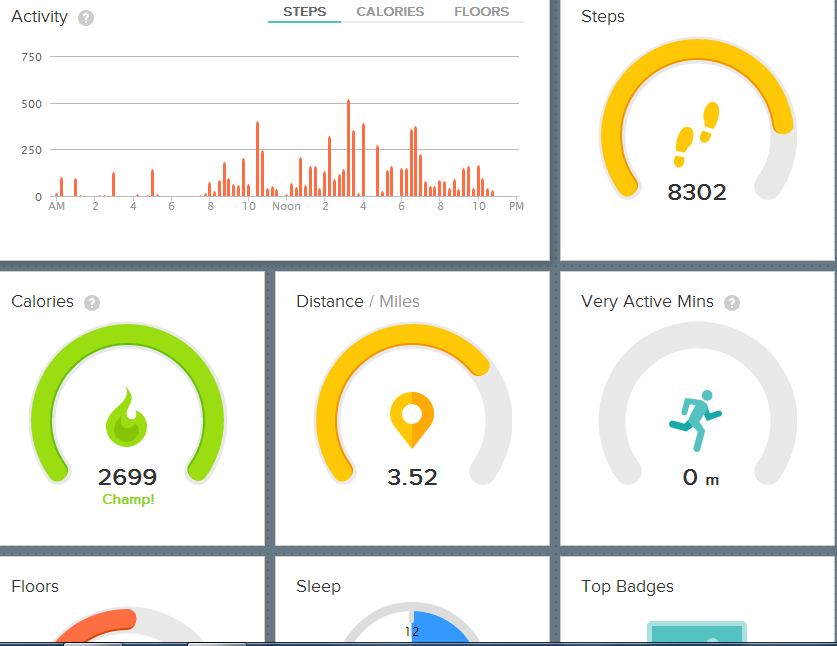
This is a part of my dashboard in my online account. I can check this out in a flash and see how my day is progressing. 
This is my sleep record for one day during this last week. It looks like I need to work on sleep. It's not as bad as you may think. My granddaughters have been visiting. Endless night time potty breaks and restlessness is the cause of this bad nights sleep. But this page does show you how well the Fitbit One tracks sleep.


These three screen clips are the logs for Blood Pressure, Glucose, and Heart rate. I have not started tracking these records but I hope to track my blood pressure and heart rate soon. 

This is one of the badges I have earned with my Fitbit One! I earned this badge this week. This is just the encouragement I need to keep on this awesome program. 

As you can tell by reading this post I really like my Fitbit One. This device is great and I can only think of a small change or two needed to make this an even greater product. The device is small and that makes it easy to forget that it is clipped to your belt or clothing. It is easy to forget the device and not move it onto a new change of clothing through out the day. If the Fitbit One could be set to beep or sound off during times of no activity. I might have a chance to realize I forgot to move the clip when I changed outfits. The Fitbit comes with a USB charging cord. The only problem I have is removing the device from the charging cord. 

Over all I love the Fitbit One. I plan to use it daily at least until I reach my weight loss goals.
What do you think? Have you been working on your health, fitness or weight loss?